Netherlands Maritime Institute of Technology (NMIT)
Our vision is to be a leading maritime institute offering education, training and consultancy services for Malaysia and the region. “Excellence with a Purpose” is the underlining philosophy of all the programmes offered to the individuals and the maritime industry.
EduCity@Iskandar will be a fully integrated knowledge-based hub comprising of world class universities, knowledge-based industry leaders, industry-centric R&D clusters, academia-industry action centre, international schools & colleges, living & recreational facilities and conference & exhibition amenities that are of world calibre. Instead of just one university with various faculties, EduCity@Iskandar will have various universities with one specialised faculty each.
The facilities on the NMIT campus will embrace the latest 21st century learning technologies e.g. computers, simulators, e-library, inter-library loan systems, multi-media learning facilities and etc. The social and spiritual needs of the diverse student population will be addressed via the co-curricular programs with the setting up of sports facilities, clubs and professional bodies organized and managed by the student themselves with the guidance of NMIT’s faculties. The campus will also be equipped with the appropriate student amenities such as cyber cafés, eateries and communication services. The incorporation of the above elements in planning the NMIT’s learning environment will definitely enrich the quality of the student education.
The Port of Tanjung
Pelepas (PTP) is port for container ships located on the eastern mouth of Pulai
River in south-western Johor, Malaysia, and is part of the APM Terminals Global
Terminal Network, which holds a minority share in the joint venture. Receiving
its maiden vessel on 10 October 1999 on a three-month trial operation, it set a
world record as the fastest growing port with 1 million twenty-foot equivalent
units (TEU) of containers handled after 571 days of operations. The good
performance sealed the port's fate, and it was officially launched by then
Prime Minister of Malaysia, Tun Dr. Mahathir Mohamad, on 13 March 2000.
Operational excellence of Port Tanjung Pelepas To ensure that Port of Tanjung Pelepas provide the best service, they implement the best and the most advance technology. Technology are smart rail system, container management system, vessel clearance system (VCS) and safety security.
Product service and business model Provide the service such as free zone, container terminal and marine service.
Free zone
Pelepas Free Zone (PFZ) is situated adjacent to the port and terminal and covers an area about 500 acer. This is segmented into different zone depending on the type of activities carried out. Of this approximately 400 acres has been designated as Free Commercial Zone (FCZ) reserved for distribution centres and distribution services. The remaining 600 acres of Free Industrial Zone (FIZ) is reserved for light, medium and heavy manufacturing industries.
Marine Service
- Fresh water supply At Berth - Fresh water supply via pipelines can be arranged at PTP berthas.
- Towage
The ship master upon the device of the pilot shall determine the number of tugs to be developed. All tugboats are fitted with fire fighting equipment and 40 ton bollard with 3200 horsepower engines.
- Pliotage
Pilotage is compulsory within the limit of Tanjung Pelepas Port and the service are provided by PTP round the clock. Minimum 7 days notification of ETA shall be given to Port Control Centre. Upon submission of Registration forms a Vessel Call Number (VCN) will be generated.
The pilot station is located at Lat. 01°14.7'E. Vessels approaching from the East or westbound lane are advised to approach the channel at the angle of not more than 20 degrees. This is due to the existence of cross current at the entrance area. A guide entering the channel will be the first pair of buoys and the sector light. The Racon (M) (3cm) fitted at Tanjung Piai beacon can also be an approaching guide by Parallel Indexing should the need arises. All vessels operating within the port limit area are under the surveillance of the Port Radar System.
Container terminal
PTP have 12 berth forming
4.3km of liner wharf, annual handling capacity of 8,400,000 TEU’s and container
yard capacity of 200,000 TEU’s. This show that PTP have a very large space
provided to their costumer.
Supplier and customers intimacy
PTP has the ability to be accepted and known as the regular partner with its customers. It is because PTP has an advance technology used, good management system and large area for business purpose. Improved decision making The main decision done by the PTP is to large the port area. PTP want larger the port area to due to the number of container, customer and ship that do their transaction in there by that ship and container can be transaction without any problem involve by the area. Competitive advantage The port of Tanjung Pelepas in Johor is the second largest container port in Malaysia. The port of Tanjung Pelepas is handling 35.2% of the country's development in the period about the container, the container are 8.8% to 5.38 million against 4.95 million. Survivle PTP is a port working towards increasing hinterland cargo volume to achieve Sustainable business model. Besides that PTP also development in Iskandar Malaysia which include the logistic that logistic that help the cargo growth and lastly, PTP is marketing their port as free zone because PTP want to attract more customers.
LINE is a propriety instant messaging application for
Smartphone and PCs. In addition, to basic messaging, Line users can send each
other images, video, and audio media message. Line was launched on 23 June 2011
by NHN Japan after the Tohoku earthquake. NHN Japan realized how inconvenient
the damaged communication system and discovered that data service would work
and be more efficient. They decided to design an application accessible on
Smartphone, tablets and desktop that works on the data network and provides a
continuous and free instant messaging and calling service. The name Line was
originated from the fact “people had to line up outside of public phones because
are programmed to take priority over network during and after an earthquake”.
In October 2011, NHN Japan chose to adopt HBase as primary storage for user
profiles, contacts and groups because of overload on the server due to the
extreme growth of users around the world. On 3 July 2012, NHN Japan announced
the new features “Home” and “Timeline” for Line. This allow user to share
recent developments in life to friends.
Features for LINE:
oReal-time confirmation when
messages are sent and delivery
oShare photos, videos, music and
more with other people
oSent current or any specific
location
oSend stickers and emoticons to
friends
oCreate or join groups where we can chat
oDirect pop-out message box for
easier reading and replying
oNew Timeline and Home page features
on Android
oWindows and Mac users can access
via the Desktop version, and Smart-tablet users via the Browser
Soft skill
is variously viewed as communication skills, interpersonal skill and the
ability to work with others, and so on. And more complex definition is “a range
abilities including work ethic, courtesy, teamwork, self-discipline and
self-confidence, professional presence, language proficiency, cultural
sensitivity communication skills, ability to accept and learn from criticism,
ability to handle client relationships, networking, creativity, ability to
motive yourself and lead others, time management, leadership and interpersonal
skills” . It is usually used in business. The important of soft skill in IT is:
1.Deal making
and meeting skills.
When people get involved, there
are bound to be disagreements and a need to arrive ay group consensus.
2.Great
communication skill.
The ability of read, write and
speak clearly and effectively are important to the business.
3.Be a team
player.
Being a team player means not
only being cooperative, but also displaying strong leadership ability when it’s
appropriate.
4.Teaching,
mentoring and knowledge sharing.
Able to teach someone else about
new applications. People who work side with others and provide mentoring and
support can be more valuable.
Business
information system (BIS) can be defined as system integrating information
technology, people and business. BIS also defined as an automated system that
creates or manages information about an organization’s activities. It includes applications whose primary purpose
is to facilitate transactions between an organization unit and its customers,
example: An e-commerce system, client relationship
management system, purpose-build or customized database, finance or human
resource systems. . BIS bring business functions and information modules
together for establishing effective communication channels which are useful for
making timely and accurate decisions and in turn contribute to organisational
productivity and competitiveness. This paradigm shift leads to global
outsourcing, strategic alliances and partnerships to be competitive in terms of
price, quality, flexibility, dependability, responsiveness. BIS that create or
manage records should have the appropriate functionally for the tasks, or they
should interface with other systems that manage the records.
Xperia Z Ultra Big screen. Big entertainment. Xperia Z Ultra – 6.4” Full HD display in the world’s slimmest smartphone.
Display:
When only the best is good enough – Full HD TRILUMINOS Display with X-Reality for mobile Xperia Z Ultra is the big screen phone that uses the very latest screen technology developed by our BRAVIA TV engineers. The large, high-resolution 6.4” Full TRILUMINOS™ Display with X-Reality for mobile comes with a 1920 x 1080 progressive scan, for incredibly crisp pictures free of jagged edges. Paired with a pixel density of 342 pixels per inch, you get pictures that are razor sharp and superiorly bright.
Quick benefits:
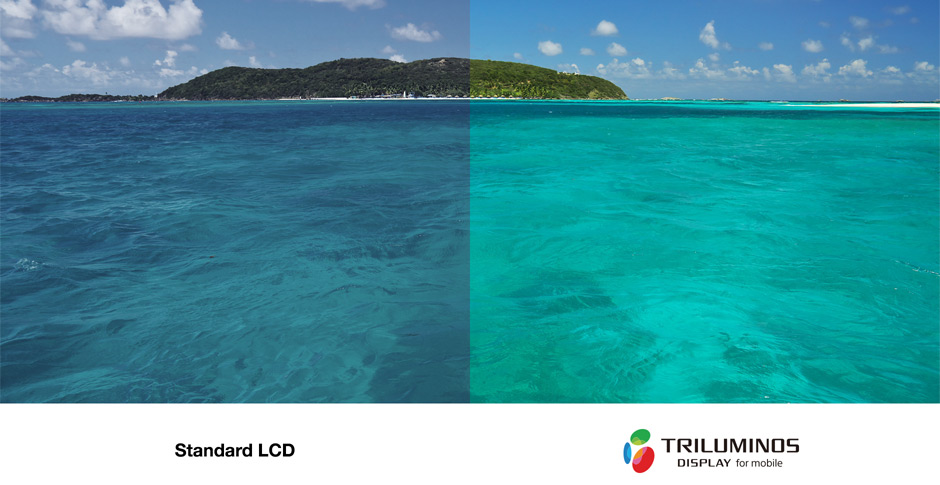
v 6.4” TRILUMINOS Display with X-Reality for mobile v Full HD 1080p v 342 pixels per inch TRILUMINOS Display for Mobile For astonishingly authentic colour Xperia Z Ultra incorporates TRILUMINOS™ Display for mobile to present rich, authentic colours with subtle tones, while replicating bold colours including hard-to-reproduce reds, blues and greens. By integrating Sony’s own unique display innovation, this technique delivers a significantly wider colour gamut, carrying a far more natural and vivid viewing experience with a heightened sense of depth. The TRILUMINOS display for mobile offers a wider range of colours to choose from, for more brilliant reds, blues and greens, when compared to a standard LCD display. X-Reality for mobile For clearer, more vivid pictures. From low-resolution web videos to high-resolution movies − with Sony’s latest picture engine, exclusive X-Reality for mobile – everything you see on Xperia Z Ultra’s big screen is analysed and selectively processed to give clean, clear and lifelike pictures. Three unique noise reduction features work their magic prior to up scaling. While Sony’s intelligent display technology analyses each image to optimise pixels, texture, outline, colour, contrast and noise, creating the best viewing experience possible. (1) Pixel reproduction: Sony’s unique Super resolution technology analyses each pixel in an image and reproduces the ones that are lacking, giving you the sharpest images. (2) Texture and outline improvement: By selectively enhancing elements that help to render the texture and sharpen the outlines, images become clearer and crisper. (3) Colour and contrast enhancement: The Intelligent Image Enhancer reproduces the vividness of the image in its original colour. Pictures are selectively optimised by enhancing the contrast, making images look more detailed and true to life. (4) Noise reduction: Intelligent Noise Reduction decreases noise which can sometimes occur in high-motion scenes or footage shot in low-light conditions. As a result, images become clearer and smoother. Gives you a better overview Experience more. Xperia Z Ultra displays 60% more than a standard smartphone.-Display area available compared to smartphones with a 5” display or smaller. You get 6 icons per row on your home screen, instead of the standard 4. Less reflective, more responsive – OptiContrast™ & Direct Touch We’ve eliminated a layer of air in the construction, bringing the touch panel closer to the display. This OptiContrast™ panel makes for less reflection and clearer viewing – even in bright sunlight, as well as creating a seamlessly black surface when the phone is turned off. By eliminating the sensor layer and integrating the sensor on the lens, we’ve managed to increase the responsiveness of the screen. So your touch is more effective and the experience on your Android smartphone is more intuitive. (1) Lens (2) Removed air layer (3) Sensor layer (4) Display Design and Durability The Design Attention to every detail Created in collaboration with Sony consumer electronic experts, Xperia Z Ultra does an excellent job of merging design with technology, creating a big screen phone with symmetry and balance in all directions. Quality craftsmanship and attention to every little detail means we’ve only selected premium materials that are nothing less than beautiful. Both the front and back are made of glass, with a seamless, refection-coated surface. The result? An Android smartphone that mirrors the world around you, while letting you get so immersed in the content that the hardware virtually disappears. Ultra slim and ultra-light
How can a 6.4” big screen phone manage to be this slim and light? We’ve eliminated a layer of air and brought the display closer to the lens, for added touch sensitivity and a smaller size. We then paired this with a new component layout and a skeleton frame. The outcome is an Android smartphone that allows for a slimness of 6.5 mm and a weight of no more than 212 grams, making Xperia Z Ultra extremely portable and easy to hold in one hand. Optimist display ratio Aluminium button Solid metal panels The Durability Ultra tough To make sure that this big screen phone can handle whatever life has in store, we designed it to be super durable. The high IP55 & IP58 rating means its waterproof* and dust resistant, so feel free to use it in the rain and bring it to the pool. Both the front and back panels are made with durable tempered glass, coated with an anti-scratch film. And the skeleton frame is made of tough glass fibre polyamide. It has superior mechanical strength, and is so strong that it’s often used as a metal substitute in cars and electronics. Quick Benefit Waterproof up to 1.5 meter In compliance with IP55 and IP58, Xperia Z Ultra is protected against the ingress of dust and is waterproof. Provided that all ports and covers are firmly closed, the phone is: -protected against low pressure jets of water from all practicable directions in compliance with IP 55 and/or; -Can be kept under 1.50 metres of freshwater for up to 30 minutes in compliance with IP58. -Test result: Dust resistance Mechanical strength frame Productivity Pen input from anywhere With its highly responsive screen that’s compatible with a pencil or stylus, this big screen phone lets you take notes using Notebook or Sketchbook. In fact, you can even take notes from a locked screen and during calls. And the high accuracy and low latency offers exact precision, for a truly authentic pen- and paper feel. Transform your handwritten notes Xperia Z Ultra comes with handwriting recognition, meaning that your handwritten notes get optically scanned and converted into text. As a result, you can easily insert your notes into whatever field you’re editing. Save time through multi-tasking apps The multi-tasking apps also help you improve productivity, so that you don’t have to lose any valuable time going between windows. Keep one hand free Prefer typing? The design of this Android smartphone paired with the easy-toggle keyboard that has both right- and left handed support makes it ideal for one-handed input. Camera Stunning shots in any light — 8 MP camera with Exmor RS™ for mobile The 8 megapixel camera is built with the same modules as leading Sony cameras. Exmor RS™ for mobile is an evolution of our Sony image sensor technology, with a next-generation BSI light sensor. By adopting the technology of luminance and colour noise reduction, we’ve created a camera that snaps highly detailed shots with low noise – even in challenging lighting conditions. You’re now also able to reproduce objects in more vivid colours and capture night images and faces in stunning clarity. Optimised imagery with HDR for photos and video HDR for photos and videos captures natural colours in any light. HDR (High Dynamic Range) is an imaging technology used to capture clear photos against strong backlight. With HDR, the camera captures the same image at different exposure levels and layers them to create one optimised photo. And Sony HDR for video lets you film in high contrast situations, like in front of a window or with the sun behind your subject. Always the right setting – Superior Auto Now it’s always easy to get a great shot. With Superior Auto, you don’t have to know the ins and outs of camera settings to make use of them. In Superior Auto mode, the camera combines Scene Recognition with high quality and high performance image processing technology (HDR and noise reduction) to automatically shoot with the optimal settings. And your Android smartphone device is automatically optimised for 36 different scenes, so you always get the best shot. Connectivity One-touch functions from Sony Sharing with friends and connecting your world has never been easier. Based on NFC (near field communication), our one-touch functions connect one device to another in a single tap. No wires, cables, or fiddling with settings necessary. One-touch sharing Share photos, music and more between two phones, or between your phone and an NFC-enabled laptop with a single touch onto the other device. One-touch mirroring See photos from your phone on your TV. Simply touch your Bluetooth smartphone to the remote from your BRAVIA® TV to activate screen mirroring. One-touch listening Play the music on your Android smartphone through a wireless speaker or wireless headphones. One-touch backup Whether you take pictures on your Xperia smartphone, tablet or camera, now you can store them in the same place. The Sony Personal Content Station™ is a wireless hub for photos and videos. From your smartphone to the big screen Want to share your memories on the big screen? Or go from headphones to speakers? “Throw” content from your Bluetooth smartphone to your Wi-Fi-enabled TV through screen mirroring or DLNA, or send your tunes to a speaker via Bluetooth. Using “Throw”, a smart application integrated into your Xperia apps, your smartphone finds the best way to wirelessly connect to other devices. With an MHL cable, you can also mirror your phone´s full user interface on your TV and enjoy movies, games and more while charging. Smart Connect Make your life simpler by setting up how your smartphone behaves when it connects to other devices. Open your music player when you connect your headphones, organise your Sony Android SmartWatch, or activate your alarm clock when your phone touches the charging dock. Smart Connect is the software that lets you manage all your smart accessories. More about Smart Connect: Connect and enjoy When you connect your headset to your smartphone, you get an optimised listening experience, in seconds. Your music player opens, the volume is set the way you like it and your favourite music is ready to play. Smart Connect makes it possible. Seamless lifestyle Each device you connect to your smartphone promises a new experience. For every type of connected device, there is a new experience configured for you. The experience is instant. Experience app Smart Connect is an application in your smartphone that lets you decide what happens when you connect your smartphone to another device. You can choose between single and multiple actions. Personal Smart Connect can adapt your devices to what you are doing. It lets you make every experience personal and perfect. Google Play Smart Connect is available for download at Google™ Play. When updates are available, you will be notified.This innovative app will also help you find new apps for your smart accessories. Smart Connect is a development of LiveWare manager.
The Port of Tanjung
Pelepas (PTP) is port for container ships located on the eastern mouth of Pulai
River in south-western Johor, Malaysia, and is part of the APM Terminals Global
Terminal Network, which holds a minority share in the joint venture. Receiving
its maiden vessel on 10 October 1999 on a three-month trial operation, it set a
world record as the fastest growing port with 1 million twenty-foot equivalent
units (TEU) of containers handled after 571 days of operations. The good
performance sealed the port's fate, and it was officially launched by then
Prime Minister of Malaysia, Tun Dr. Mahathir Mohamad, on 13 March 2000.
Operational excellence of Port Tanjung Pelepas To ensure that Port of Tanjung Pelepas provide the best service, they implement the best and the most advance technology. Technology are smart rail system, container management system, vessel clearance system (VCS) and safety security.
Product service and business model Provide the service such as free zone, container terminal and marine service.
Free zone
Pelepas Free Zone (PFZ) is situated adjacent to the port and terminal and covers an area about 500 acer. This is segmented into different zone depending on the type of activities carried out. Of this approximately 400 acres has been designated as Free Commercial Zone (FCZ) reserved for distribution centres and distribution services. The remaining 600 acres of Free Industrial Zone (FIZ) is reserved for light, medium and heavy manufacturing industries.
Marine Service
- Fresh water supply At Berth - Fresh water supply via pipelines can be arranged at PTP berthas.
- Towage
The ship master upon the device of the pilot shall determine the number of tugs to be developed. All tugboats are fitted with fire fighting equipment and 40 ton bollard with 3200 horsepower engines.
- Pliotage
Pilotage is compulsory within the limit of Tanjung Pelepas Port and the service are provided by PTP round the clock. Minimum 7 days notification of ETA shall be given to Port Control Centre. Upon submission of Registration forms a Vessel Call Number (VCN) will be generated.
The pilot station is located at Lat. 01°14.7'E. Vessels approaching from the East or westbound lane are advised to approach the channel at the angle of not more than 20 degrees. This is due to the existence of cross current at the entrance area. A guide entering the channel will be the first pair of buoys and the sector light. The Racon (M) (3cm) fitted at Tanjung Piai beacon can also be an approaching guide by Parallel Indexing should the need arises. All vessels operating within the port limit area are under the surveillance of the Port Radar System.
Container terminal
PTP have 12 berth forming
4.3km of liner wharf, annual handling capacity of 8,400,000 TEU’s and container
yard capacity of 200,000 TEU’s. This show that PTP have a very large space
provided to their costumer.
Supplier and customers intimacy
PTP has the ability to be accepted and known as the regular partner with its customers. It is because PTP has an advance technology used, good management system and large area for business purpose. Improved decision making The main decision done by the PTP is to large the port area. PTP want larger the port area to due to the number of container, customer and ship that do their transaction in there by that ship and container can be transaction without any problem involve by the area. Competitive advantage The port of Tanjung Pelepas in Johor is the second largest container port in Malaysia. The port of Tanjung Pelepas is handling 35.2% of the country's development in the period about the container, the container are 8.8% to 5.38 million against 4.95 million. Survivle PTP is a port working towards increasing hinterland cargo volume to achieve Sustainable business model. Besides that PTP also development in Iskandar Malaysia which include the logistic that logistic that help the cargo growth and lastly, PTP is marketing their port as free zone because PTP want to attract more customers.
LINE is a propriety instant messaging application for
Smartphone and PCs. In addition, to basic messaging, Line users can send each
other images, video, and audio media message. Line was launched on 23 June 2011
by NHN Japan after the Tohoku earthquake. NHN Japan realized how inconvenient
the damaged communication system and discovered that data service would work
and be more efficient. They decided to design an application accessible on
Smartphone, tablets and desktop that works on the data network and provides a
continuous and free instant messaging and calling service. The name Line was
originated from the fact “people had to line up outside of public phones because
are programmed to take priority over network during and after an earthquake”.
In October 2011, NHN Japan chose to adopt HBase as primary storage for user
profiles, contacts and groups because of overload on the server due to the
extreme growth of users around the world. On 3 July 2012, NHN Japan announced
the new features “Home” and “Timeline” for Line. This allow user to share
recent developments in life to friends.
Features for LINE:
oReal-time confirmation when
messages are sent and delivery
oShare photos, videos, music and
more with other people
oSent current or any specific
location
oSend stickers and emoticons to
friends
oCreate or join groups where we can chat
oDirect pop-out message box for
easier reading and replying
oNew Timeline and Home page features
on Android
oWindows and Mac users can access
via the Desktop version, and Smart-tablet users via the Browser
Soft skill
is variously viewed as communication skills, interpersonal skill and the
ability to work with others, and so on. And more complex definition is “a range
abilities including work ethic, courtesy, teamwork, self-discipline and
self-confidence, professional presence, language proficiency, cultural
sensitivity communication skills, ability to accept and learn from criticism,
ability to handle client relationships, networking, creativity, ability to
motive yourself and lead others, time management, leadership and interpersonal
skills” . It is usually used in business. The important of soft skill in IT is:
1.Deal making
and meeting skills.
When people get involved, there
are bound to be disagreements and a need to arrive ay group consensus.
2.Great
communication skill.
The ability of read, write and
speak clearly and effectively are important to the business.
3.Be a team
player.
Being a team player means not
only being cooperative, but also displaying strong leadership ability when it’s
appropriate.
4.Teaching,
mentoring and knowledge sharing.
Able to teach someone else about
new applications. People who work side with others and provide mentoring and
support can be more valuable.
Business
information system (BIS) can be defined as system integrating information
technology, people and business. BIS also defined as an automated system that
creates or manages information about an organization’s activities. It includes applications whose primary purpose
is to facilitate transactions between an organization unit and its customers,
example: An e-commerce system, client relationship
management system, purpose-build or customized database, finance or human
resource systems. . BIS bring business functions and information modules
together for establishing effective communication channels which are useful for
making timely and accurate decisions and in turn contribute to organisational
productivity and competitiveness. This paradigm shift leads to global
outsourcing, strategic alliances and partnerships to be competitive in terms of
price, quality, flexibility, dependability, responsiveness. BIS that create or
manage records should have the appropriate functionally for the tasks, or they
should interface with other systems that manage the records.
Xperia Z Ultra Big screen. Big entertainment. Xperia Z Ultra – 6.4” Full HD display in the world’s slimmest smartphone.
Display:
When only the best is good enough – Full HD TRILUMINOS Display with X-Reality for mobile Xperia Z Ultra is the big screen phone that uses the very latest screen technology developed by our BRAVIA TV engineers. The large, high-resolution 6.4” Full TRILUMINOS™ Display with X-Reality for mobile comes with a 1920 x 1080 progressive scan, for incredibly crisp pictures free of jagged edges. Paired with a pixel density of 342 pixels per inch, you get pictures that are razor sharp and superiorly bright.
Quick benefits:
v 6.4” TRILUMINOS Display with X-Reality for mobile v Full HD 1080p v 342 pixels per inch TRILUMINOS Display for Mobile For astonishingly authentic colour Xperia Z Ultra incorporates TRILUMINOS™ Display for mobile to present rich, authentic colours with subtle tones, while replicating bold colours including hard-to-reproduce reds, blues and greens. By integrating Sony’s own unique display innovation, this technique delivers a significantly wider colour gamut, carrying a far more natural and vivid viewing experience with a heightened sense of depth. The TRILUMINOS display for mobile offers a wider range of colours to choose from, for more brilliant reds, blues and greens, when compared to a standard LCD display. X-Reality for mobile For clearer, more vivid pictures. From low-resolution web videos to high-resolution movies − with Sony’s latest picture engine, exclusive X-Reality for mobile – everything you see on Xperia Z Ultra’s big screen is analysed and selectively processed to give clean, clear and lifelike pictures. Three unique noise reduction features work their magic prior to up scaling. While Sony’s intelligent display technology analyses each image to optimise pixels, texture, outline, colour, contrast and noise, creating the best viewing experience possible. (1) Pixel reproduction: Sony’s unique Super resolution technology analyses each pixel in an image and reproduces the ones that are lacking, giving you the sharpest images. (2) Texture and outline improvement: By selectively enhancing elements that help to render the texture and sharpen the outlines, images become clearer and crisper. (3) Colour and contrast enhancement: The Intelligent Image Enhancer reproduces the vividness of the image in its original colour. Pictures are selectively optimised by enhancing the contrast, making images look more detailed and true to life. (4) Noise reduction: Intelligent Noise Reduction decreases noise which can sometimes occur in high-motion scenes or footage shot in low-light conditions. As a result, images become clearer and smoother. Gives you a better overview Experience more. Xperia Z Ultra displays 60% more than a standard smartphone.-Display area available compared to smartphones with a 5” display or smaller. You get 6 icons per row on your home screen, instead of the standard 4. Less reflective, more responsive – OptiContrast™ & Direct Touch We’ve eliminated a layer of air in the construction, bringing the touch panel closer to the display. This OptiContrast™ panel makes for less reflection and clearer viewing – even in bright sunlight, as well as creating a seamlessly black surface when the phone is turned off. By eliminating the sensor layer and integrating the sensor on the lens, we’ve managed to increase the responsiveness of the screen. So your touch is more effective and the experience on your Android smartphone is more intuitive. (1) Lens (2) Removed air layer (3) Sensor layer (4) Display Design and Durability The Design Attention to every detail Created in collaboration with Sony consumer electronic experts, Xperia Z Ultra does an excellent job of merging design with technology, creating a big screen phone with symmetry and balance in all directions. Quality craftsmanship and attention to every little detail means we’ve only selected premium materials that are nothing less than beautiful. Both the front and back are made of glass, with a seamless, refection-coated surface. The result? An Android smartphone that mirrors the world around you, while letting you get so immersed in the content that the hardware virtually disappears. Ultra slim and ultra-light
How can a 6.4” big screen phone manage to be this slim and light? We’ve eliminated a layer of air and brought the display closer to the lens, for added touch sensitivity and a smaller size. We then paired this with a new component layout and a skeleton frame. The outcome is an Android smartphone that allows for a slimness of 6.5 mm and a weight of no more than 212 grams, making Xperia Z Ultra extremely portable and easy to hold in one hand. Optimist display ratio Aluminium button Solid metal panels The Durability Ultra tough To make sure that this big screen phone can handle whatever life has in store, we designed it to be super durable. The high IP55 & IP58 rating means its waterproof* and dust resistant, so feel free to use it in the rain and bring it to the pool. Both the front and back panels are made with durable tempered glass, coated with an anti-scratch film. And the skeleton frame is made of tough glass fibre polyamide. It has superior mechanical strength, and is so strong that it’s often used as a metal substitute in cars and electronics. Quick Benefit Waterproof up to 1.5 meter In compliance with IP55 and IP58, Xperia Z Ultra is protected against the ingress of dust and is waterproof. Provided that all ports and covers are firmly closed, the phone is: -protected against low pressure jets of water from all practicable directions in compliance with IP 55 and/or; -Can be kept under 1.50 metres of freshwater for up to 30 minutes in compliance with IP58. -Test result: Dust resistance Mechanical strength frame Productivity Pen input from anywhere With its highly responsive screen that’s compatible with a pencil or stylus, this big screen phone lets you take notes using Notebook or Sketchbook. In fact, you can even take notes from a locked screen and during calls. And the high accuracy and low latency offers exact precision, for a truly authentic pen- and paper feel. Transform your handwritten notes Xperia Z Ultra comes with handwriting recognition, meaning that your handwritten notes get optically scanned and converted into text. As a result, you can easily insert your notes into whatever field you’re editing. Save time through multi-tasking apps The multi-tasking apps also help you improve productivity, so that you don’t have to lose any valuable time going between windows. Keep one hand free Prefer typing? The design of this Android smartphone paired with the easy-toggle keyboard that has both right- and left handed support makes it ideal for one-handed input. Camera Stunning shots in any light — 8 MP camera with Exmor RS™ for mobile The 8 megapixel camera is built with the same modules as leading Sony cameras. Exmor RS™ for mobile is an evolution of our Sony image sensor technology, with a next-generation BSI light sensor. By adopting the technology of luminance and colour noise reduction, we’ve created a camera that snaps highly detailed shots with low noise – even in challenging lighting conditions. You’re now also able to reproduce objects in more vivid colours and capture night images and faces in stunning clarity. Optimised imagery with HDR for photos and video HDR for photos and videos captures natural colours in any light. HDR (High Dynamic Range) is an imaging technology used to capture clear photos against strong backlight. With HDR, the camera captures the same image at different exposure levels and layers them to create one optimised photo. And Sony HDR for video lets you film in high contrast situations, like in front of a window or with the sun behind your subject. Always the right setting – Superior Auto Now it’s always easy to get a great shot. With Superior Auto, you don’t have to know the ins and outs of camera settings to make use of them. In Superior Auto mode, the camera combines Scene Recognition with high quality and high performance image processing technology (HDR and noise reduction) to automatically shoot with the optimal settings. And your Android smartphone device is automatically optimised for 36 different scenes, so you always get the best shot. Connectivity One-touch functions from Sony Sharing with friends and connecting your world has never been easier. Based on NFC (near field communication), our one-touch functions connect one device to another in a single tap. No wires, cables, or fiddling with settings necessary. One-touch sharing Share photos, music and more between two phones, or between your phone and an NFC-enabled laptop with a single touch onto the other device. One-touch mirroring See photos from your phone on your TV. Simply touch your Bluetooth smartphone to the remote from your BRAVIA® TV to activate screen mirroring. One-touch listening Play the music on your Android smartphone through a wireless speaker or wireless headphones. One-touch backup Whether you take pictures on your Xperia smartphone, tablet or camera, now you can store them in the same place. The Sony Personal Content Station™ is a wireless hub for photos and videos. From your smartphone to the big screen Want to share your memories on the big screen? Or go from headphones to speakers? “Throw” content from your Bluetooth smartphone to your Wi-Fi-enabled TV through screen mirroring or DLNA, or send your tunes to a speaker via Bluetooth. Using “Throw”, a smart application integrated into your Xperia apps, your smartphone finds the best way to wirelessly connect to other devices. With an MHL cable, you can also mirror your phone´s full user interface on your TV and enjoy movies, games and more while charging. Smart Connect Make your life simpler by setting up how your smartphone behaves when it connects to other devices. Open your music player when you connect your headphones, organise your Sony Android SmartWatch, or activate your alarm clock when your phone touches the charging dock. Smart Connect is the software that lets you manage all your smart accessories. More about Smart Connect: Connect and enjoy When you connect your headset to your smartphone, you get an optimised listening experience, in seconds. Your music player opens, the volume is set the way you like it and your favourite music is ready to play. Smart Connect makes it possible. Seamless lifestyle Each device you connect to your smartphone promises a new experience. For every type of connected device, there is a new experience configured for you. The experience is instant. Experience app Smart Connect is an application in your smartphone that lets you decide what happens when you connect your smartphone to another device. You can choose between single and multiple actions. Personal Smart Connect can adapt your devices to what you are doing. It lets you make every experience personal and perfect. Google Play Smart Connect is available for download at Google™ Play. When updates are available, you will be notified.This innovative app will also help you find new apps for your smart accessories. Smart Connect is a development of LiveWare manager.


 0 sailer